Software by Nubaris · for Windows

From file server to SharePoint. Checked folder by folder.

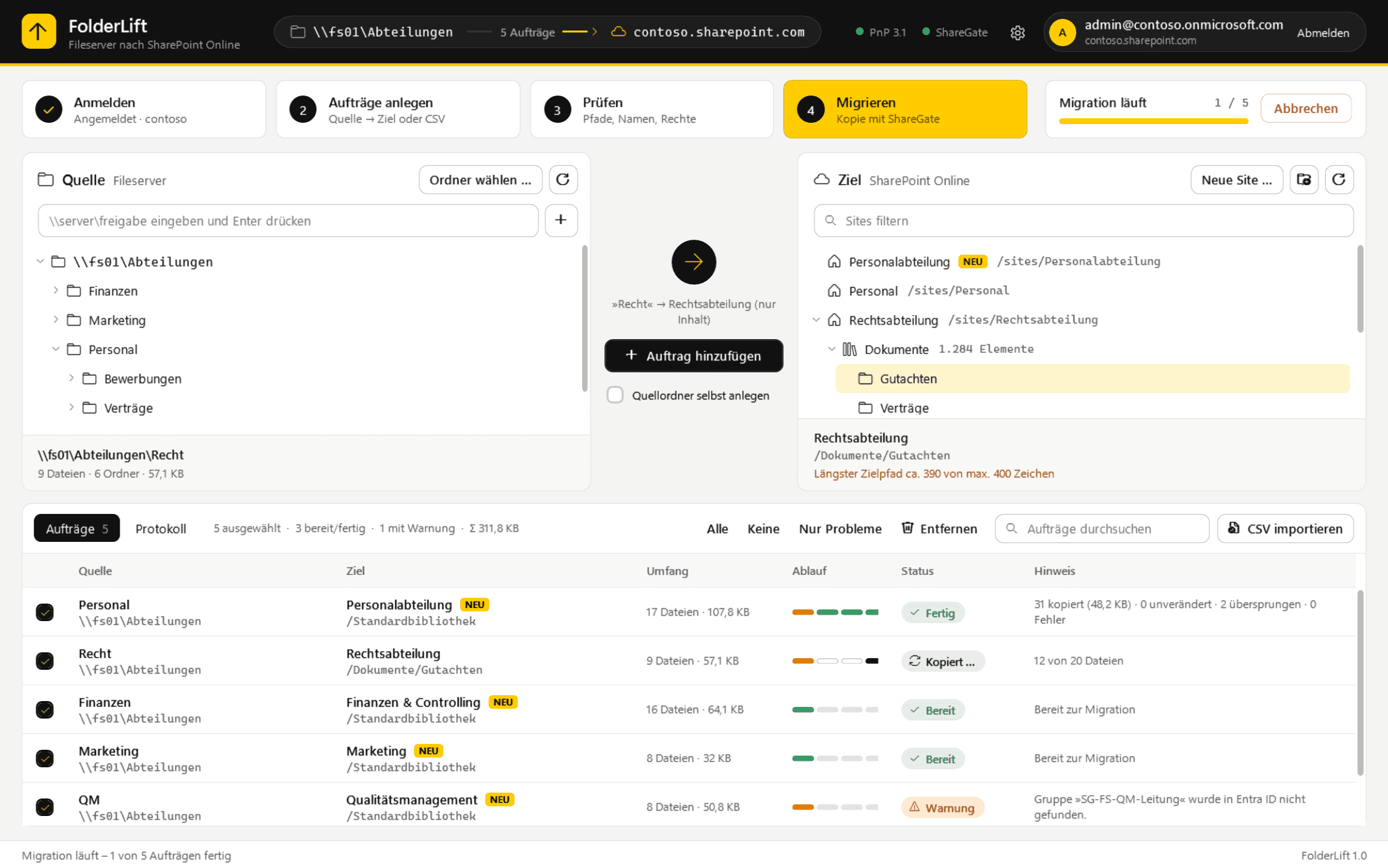
FolderLift finds invalid names and overly long paths before they become a problem, provisions new sites with their permissions and copies incrementally, as often as you like, right up to the cut-over.

Version 1.7.0 · Windows 10/11 & Server 2016+ · installs without admin rights

On first start Windows SmartScreen asks: “More info” → “Run anyway”.

FolderLift · File server to SharePoint Online
FolderLift with the source tree, the SharePoint target tree and a list of migration jobs
How it works

Four steps. No surprises on cut-over day.

  1. 1

    Sign in

    One click on “Sign in with Microsoft”, then sign in with MFA in the browser. No app registration, no client ID.

  2. 2

    Create jobs

    Pick a folder on the file server on the left, a site, library or folder on the right. Or import hundreds of mappings from a CSV.

  3. 3

    Check

    Invalid names, paths over 400 characters, oversized files, missing groups: you see it all before anything happens.

  4. 4

    Migrate

    Provision new sites with permissions and copy. Repeated runs only transfer what has changed.

Features

Built by an admin who runs these migrations himself.

Not a suite with a hundred switches, but exactly what matters when moving from a file server to SharePoint.

Checks before it breaks

One click analyzes the folder: file count, size, names that SharePoint rejects, and paths that scrape the 400-character limit, before anything is created or copied.

✓ 18,412 files · 1,906 folders · 12.6 GB

⚠ Longest target path approx. 383 of 400 characters

✕ _vti_alt.docx – name not allowed in SharePoint

· 12 system files (Thumbs.db, ~$…) are skipped

Sites with permissions

New sites with template, language and owner. Your groups land straight on members and visitors.

Delta up to cut-over

Copy today, catch up tomorrow: every further run transfers only new and changed files.

ShareGate or its own engine

An existing ShareGate is used, otherwise FolderLift copies on its own, with time stamps.

Your data stays with you

Runs locally, talks only to your tenant. No telemetry, no account with us.

Installs like a real program

MSI installer without admin rights, a setup assistant on first start, with PnP.PowerShell and sign-in one click away.

Get the installer
Pricing

Try first. Then migrate for a year.

Every edition can do everything. The only difference is who you migrate for.

Trial

Full feature set, no sign-up.

€030 days

  • All features unlocked
  • Keep checking afterwards, migrate with a license
  • Jobs are kept when you buy
Download for free

FolderLift Standard

For a single company migrating its own file server.

€199per year

  • For one company and its Microsoft 365 tenant
  • Also runs on Windows Server 2016 and newer
  • All features including site provisioning
  • Updates for 12 months
  • Email support
Buy €199
For MSPs

FolderLift Partner

For IT service providers migrating for their clients.

€790per year

  • Migrate across any number of client tenants
  • Also runs on Windows Server 2016 and newer
  • All features including site provisioning
  • Updates for 12 months
  • Priority support
Buy €790

Remote setup – 60 minutes, installation, sign-in and admin consent, a first check and a test run. €89 once.

Go to shop

For businesses only. Prices in euro; PayPal converts at checkout. No subscription, the license simply expires after 12 months.

Questions

What admins want to know up front.

What do I need to use FolderLift?

A Windows machine with access to the file server, PowerShell 7 and a Microsoft 365 account with SharePoint administrator rights. The trial runs on Windows 10/11; with a Standard or Partner license it also runs on Windows Server 2016 and newer. The setup assistant installs PnP.PowerShell on first start. On the first sign-in, an administrator consents once for the organization. No app registration of your own is required.

Windows warns when installing. Is that normal?

Yes. FolderLift is new, so the Windows SmartScreen filter does not know the installer yet. In the browser choose “Keep”, and on start click “More info” and then “Run anyway”. The install needs no admin rights and lands only in your user profile.

Do I need ShareGate?

No. If ShareGate Desktop is installed, FolderLift uses it for the copy, with reports and high throughput. Without ShareGate, FolderLift copies on its own via PnP, also incrementally.

Does FolderLift change anything on the file server?

No. The source is read only. Changes happen only in the target tenant, and only after you have checked and clicked “Migrate”.

What happens after the 30-day trial?

Browsing and checking keep working. To migrate you then need a license key. Your jobs and settings are preserved.

How do I get my license?

Right after payment: the key appears on the confirmation page and also arrives by email, together with a license file. In FolderLift, click the license status at the top right, paste it in, done. No internet connection needed.

Does FolderLift run on Windows Server too?

Yes. With a Standard or Partner license, FolderLift also runs on Windows Server 2016 and newer, ideal right on the file server. The free trial is limited to Windows 10/11.

What is the difference between Standard and Partner?

Standard is for your own company and its Microsoft 365 tenant, on any number of machines. Partner is for IT service providers who migrate for several clients, and covers any number of tenants. If your company changes tenant, we reissue the Standard license free of charge.

Does the license renew automatically?

No, there is no subscription. The license runs for twelve months. If you want to continue, you simply buy a new annual license.

Will my data be sent to Nubaris?

No. FolderLift runs only on your machine and talks solely to your Microsoft 365 tenant. No telemetry, no cloud in between.

Try it on a real folder.

30 days, all features, no sign-up. You simply keep your jobs when you buy.